For Mac · Works with your DSLR or mirrorless

You shot 400 photos of the game.
Keepers finds the ten worth sharing.

Point Keepers at the folder from your camera. Under a minute later your best shots are ranked, explained, and ready to send to the grandparents. No Lightroom. No subscription. Nothing leaves your Mac.

Free for your first three games, then one a month. Or $59.99, once, for unlimited. macOS 15 or later, Apple silicon or Intel.

How it works

Folder in. Keepers out.

1

Point it at your photo folder

The folder you copied off the camera, or the SD card itself. JPEG, HEIC, or RAW from Canon, Nikon, Sony, Fujifilm, and more. No import, no catalog.

2

Every shot gets scored

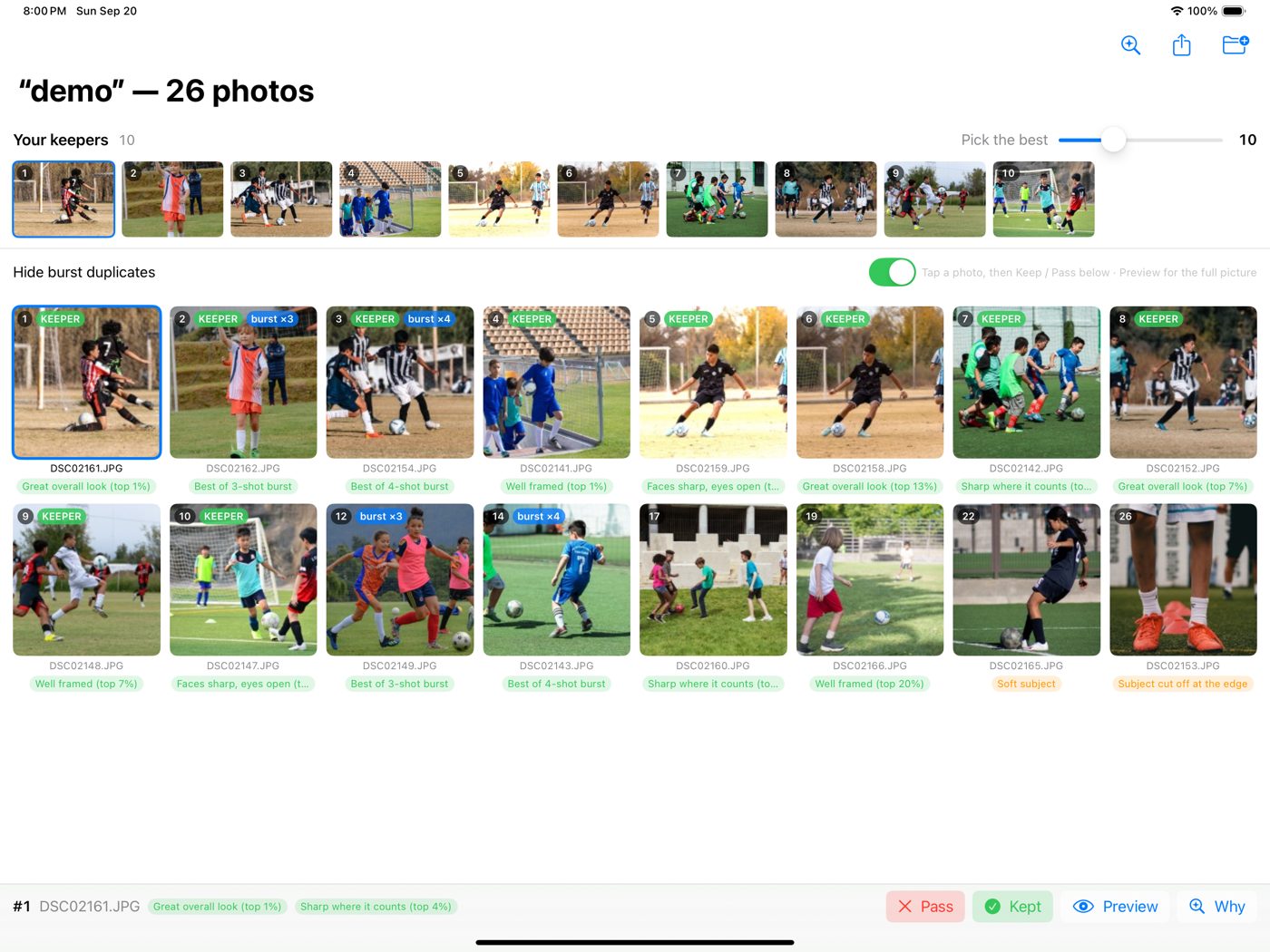
Sharp faces, open eyes, focus on the player instead of the grass, framing, exposure. Bursts collapse to their best frame.

3

Export the keepers

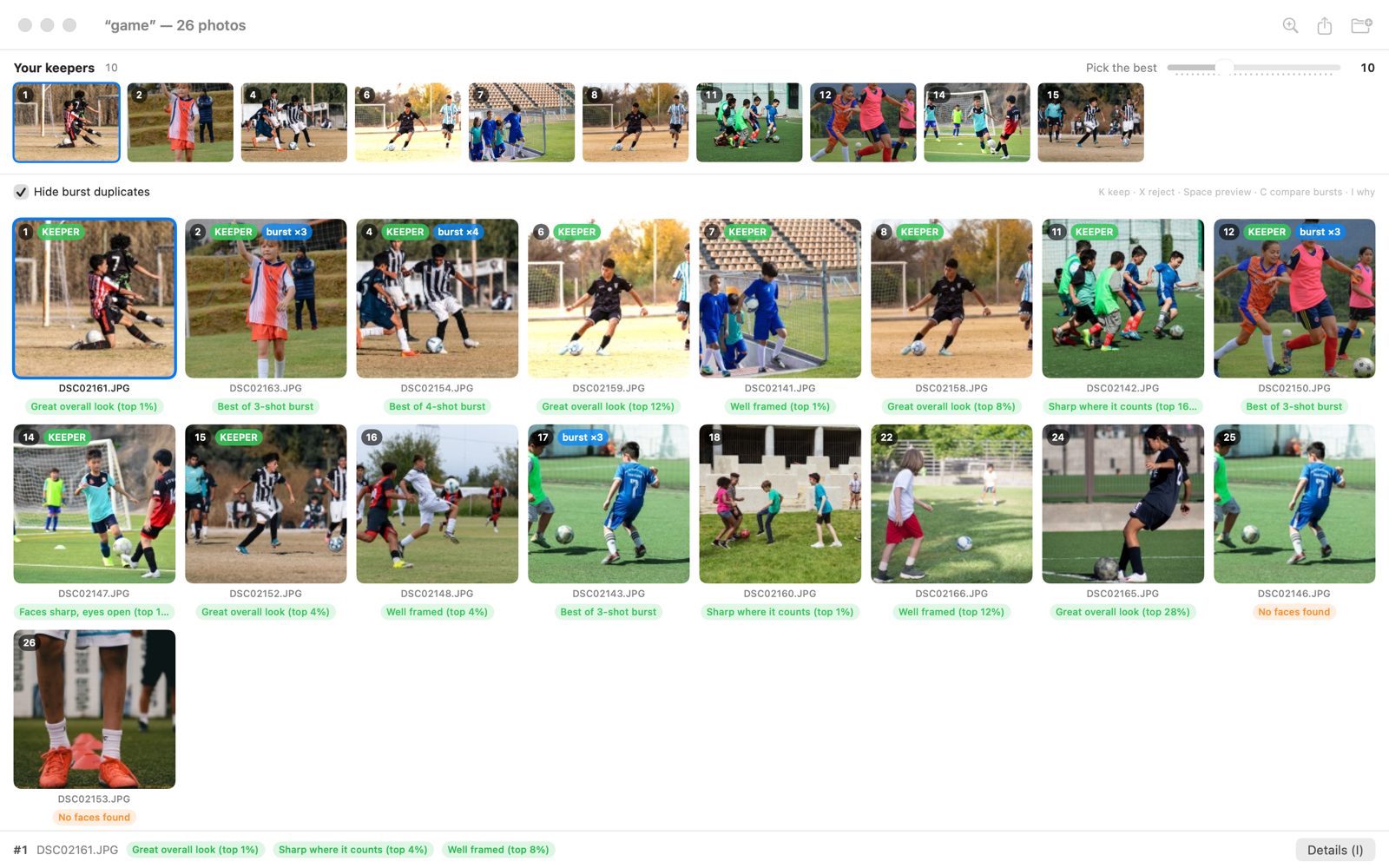
Ten ranked winners in a rail across the top. Tap K to keep, X to skip. Export the full-quality originals to a dated folder, ready to share.

A 200-shot game in under a minute on Apple silicon. Re-open the same folder and it is instant.

What it looks at

It looks where you would look.

Generic photo apps rate the whole frame. Keepers rates the player.

  • Faces first. In focus, eyes open, well lit. The difference between a keeper and a deleter.
  • Sharp on the subject. Sharpness is measured inside the subject, not on a background you blurred on purpose.
  • Framing that reads. Rule of thirds, subject size, and whether the frame cut someone off.
  • Exposure you can rescue. Blown white jerseys and crushed shadows are marked, not hidden.
Bursts

Shoot the burst. Keep the frame.

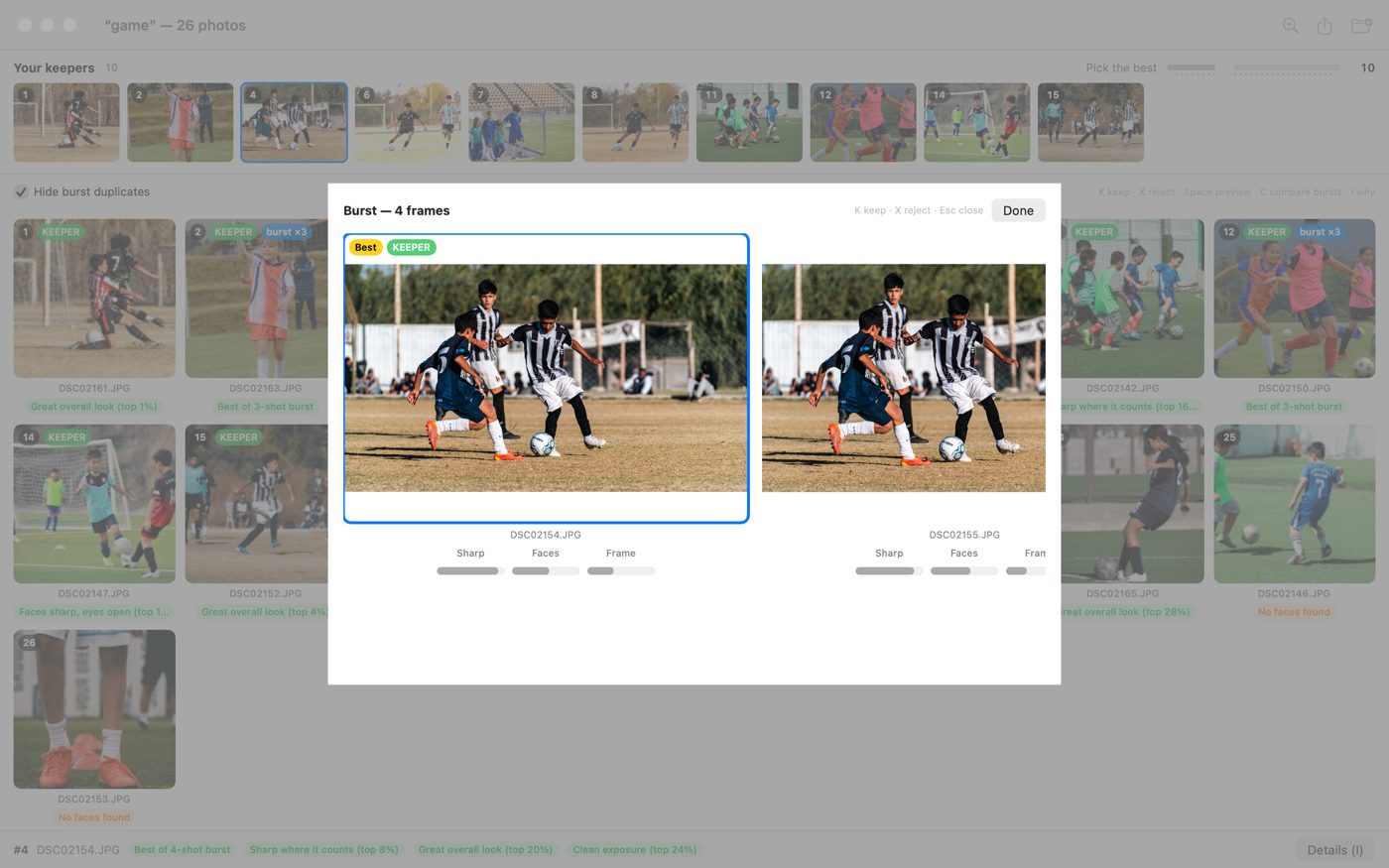
Hold the shutter as long as you like. Keepers groups every burst, shows you its best frame, and lets you pick a different one if you know better. Take as many bursts as it takes to catch the moment, and let Keepers do the sorting.

  • The best frame, chosen for you. Sharpest, eyes open, best framed. One burst never eats two spots in your top ten.
  • Or pick your own. Press C on any burst to see the frames side by side with their scores. Prefer the one just before the goal? K keeps it.
  • Duplicates hidden, not deleted. The grid shows the best of each burst by default. Nothing is touched on disk.
Why this pick

Every pick, explained in plain English.

No black box. Open the Why panel and see exactly what Keepers saw, then nudge the sliders if you care more about faces than framing. The ranking updates live.

  • Plain-language reasons on every photo: “Faces sharp, eyes open (top 2%)” or “Subject cut off at the edge.”
  • A shooting coach that turns each miss into one tip for next time, from the actual EXIF: shutter, ISO, framing.
  • Your weights, your ranking. Five sliders. Drag one and watch the grid reorder instantly.
Suggested reframe

The shot you almost got. Rescued.

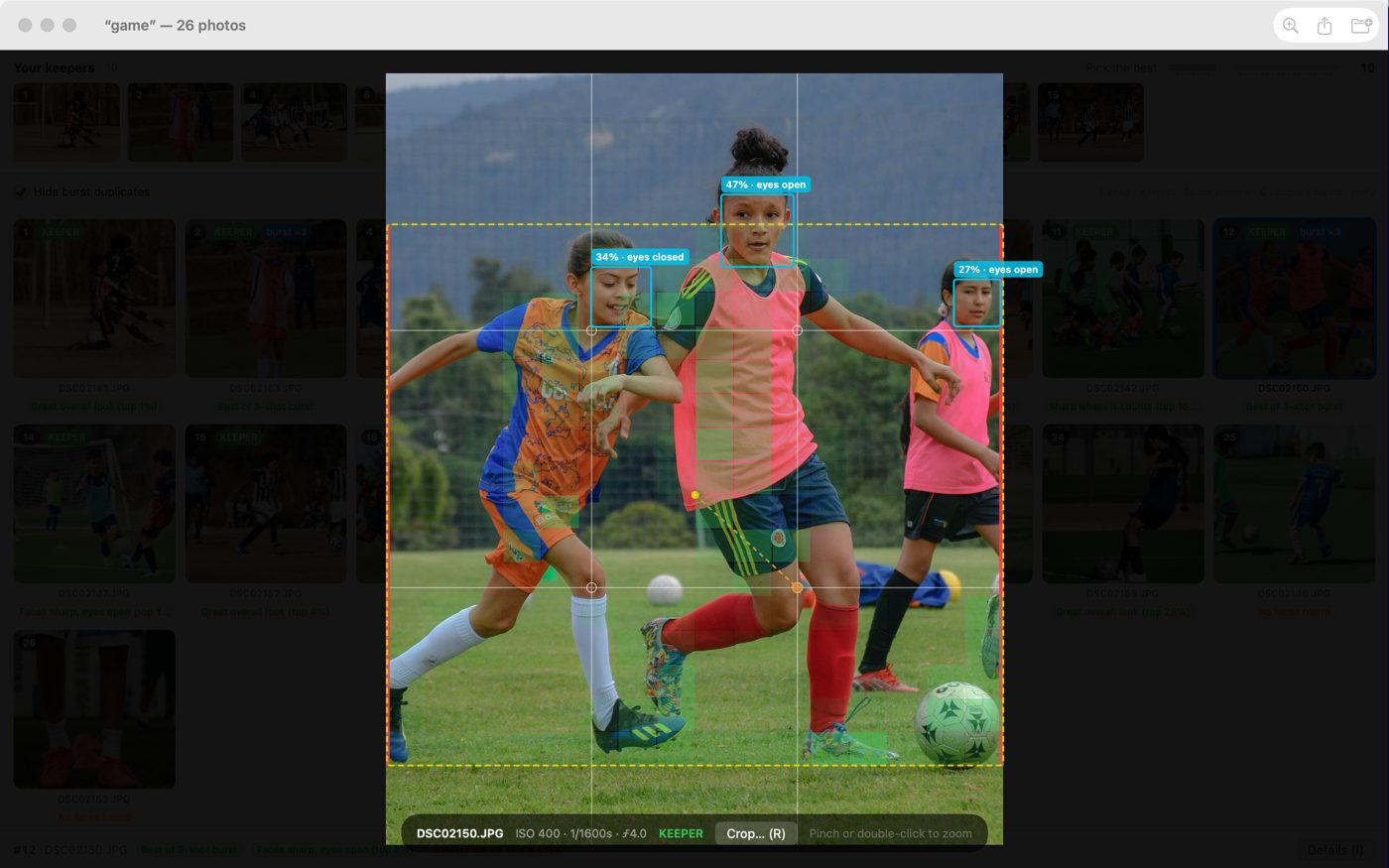
Dead-center player, acres of empty grass? Keepers finds the crop that puts the action on a thirds point with room to run, and shows you why.

  • Composition-aware. Built from where the eye goes, the faces, and the sharpest point, not a fixed grid.
  • Yours to adjust. Drag it, resize it, hold Shift to pull one edge, or lock any aspect from 3:2 to 4:5.
  • Saved as a new keeper. A full-resolution JPEG lands next to the original, in the same burst, ready to export. The original is never touched.
Built for the weekend, not the darkroom

Everything you need to get from card to keepers. Nothing you don’t.

RAW, straight off the card

CR2, CR3, NEF, ARW, RAF, ORF, DNG, and more, plus JPEG and HEIC. Unsupported bodies fall back to the embedded preview and say so.

Keyboard-first culling

Arrows to move, K to keep, X to skip, Space to preview at full size, C to compare a burst, R to crop. Two hundred decisions in minutes.

On-device, always

Apple’s built-in image intelligence does the work on your Mac. No uploads, no account, no waiting on a server.

Instant re-opens

Every photo is remembered by its content. Open the same card next weekend and the ranking appears immediately.

Export originals, untouched

Keepers copies your full-quality files, original filenames, into a dated folder. Show in Finder, AirDrop, done.

Any folder, any size

A single half, a full tournament weekend, or the whole season folder. Cancel mid-run and the ranking you have is still usable.

Private by design

Your kids’ photos stay on your Mac.

Keepers never uploads a photo, a face, or a thumbnail. There is no account to create and no cloud to trust. The analysis runs on the same on-device intelligence that powers Photos, and it is done before the coffee is.

0photos uploaded
0accounts
0subscriptions
Pricing

Try it on three games. Then buy it once.

Every feature is free to use on unlimited photos. Exporting your keepers is free for your first three sessions, and one session a month after that.

Free
$0
Download from the Mac App Store
  • Unlimited photos, unlimited folders
  • Ranking, bursts, Why panel, coach, crops
  • Full-resolution preview and compare
  • Export keepers from 3 sessions, then 1 a month
Keepers Unlimited
$59.99
One-time purchase. Yours forever.
  • Everything in Free
  • Unlimited exports, every game, every season
  • Free updates, no renewal
  • Family Sharing on the Mac App Store

Less than five months of a photo-editing subscription, for an app you’ll actually open on Sunday night.

Keepers app icon

Your next game is this weekend.

Download Keepers now, point it at the folder, and Sunday night takes ten minutes instead of two hours.

Free for your first three games, then one a month. macOS 15 or later.